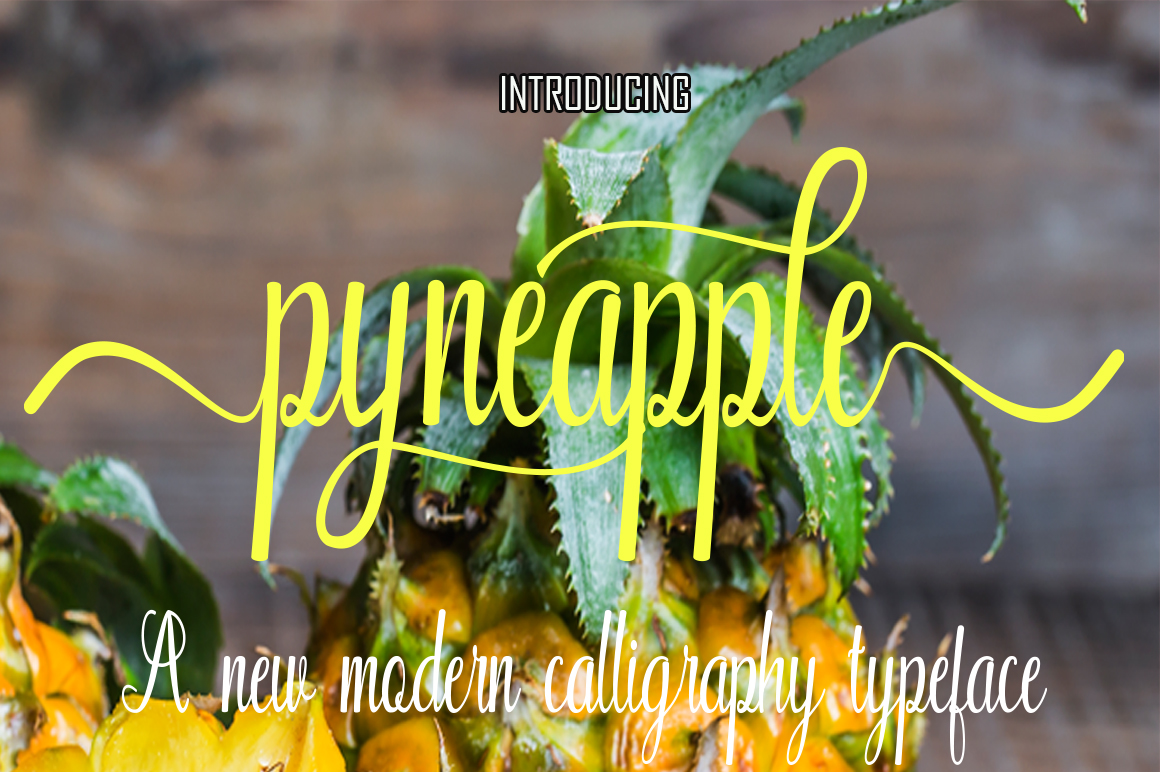
Pyneapple: Bringing Handwritten Charm to Your Everyday Projects
If you’ve ever scrolled through your design software feeling like every font looks a little too stiff or corporate, you’re not alone. That’s where Pyneapple comes in. Created by Naqsya.Co., this handwritten typeface has been quietly making its way into logos, invitations, social media graphics, and even product packaging. But what makes Pyneapple stand out from the sea of script fonts? It’s not just the way the letters loop and slant – it’s how the font manages to feel both playful and polished at the same time. Let’s dive into the situations where Pyneapple really shines, and why so many creative professionals and hobbyists are adding it to their toolkit.
Real Brands, Real Personality: Using Pyneapple in Business
When you’re building a brand from scratch – or refreshing one that’s gone a bit stale – the first impression often comes from your typography. Pyneapple offers a handcrafted aesthetic that’s hard to achieve with standard fonts. A local coffee shop, for example, might use it on their menu boards to signal warmth and authenticity. A boutique clothing label could feature Pyneapple on hang tags or care labels to suggest individuality. Even service-based businesses like hair salons or tattoo studios find that the font’s organic curves help them stand out in a crowded market.
One observation I’ve made from working with small business owners is that many worry about looking “too unserious” with a handwritten font. But Pyneapple strikes a careful balance. The letterforms are consistent enough to feel intentional, yet varied enough to mimic real handwriting. That subtle imperfection is exactly what makes customers feel like they’re dealing with real people, not a faceless corporation. For a wedding planner or an event florist, using Pyneapple across business cards, website headers, and proposal PDFs can create a cohesive, emotional thread that ties everything together.
Social Media That Actually Stops the Scroll
Scrolling through Instagram these days can feel like walking through a gallery of samey templates. Every post uses the same bold sans‑serif or overused script. Pyneapple offers a breath of fresh air. When you drop it onto a flat lay photo of a morning coffee or a behind‑the‑scenes shot of your workspace, the font seems almost to belong there – like you wrote the words yourself with a favorite pen.
I’ve seen content creators use Pyneapple for quote cards, and the difference is noticeable. Because the font has a natural rhythm, it doesn’t compete with the image; it complements it. For lifestyle influencers, bullet journal accounts, and small‑batch makers, Pyneapple can become a signature element. Even if you’re not a designer, placing a short phrase in Pyneapple over a simple background can transform a so‑so post into something shareable. And the best part? It works just as well on Stories, where you can pair it with a subtle drop shadow or outline to make the lettering pop.
Weddings, Events, and All the Paper Goods
There’s a reason handwritten fonts dominate the wedding industry – couples want their invitations to feel personal, like a note from the heart. Pyneapple is a popular choice for save‑the‑dates, ceremony programs, and thank‑you cards because it carries that handwritten warmth without being messy. I’ve seen it used on signage for baby showers, birthday parties, and even corporate retreats where the goal was to foster a relaxed, friendly vibe.
What I appreciate about Pyneapple in these contexts is how it handles longer text blocks. Many script fonts become hard to read when you paste a whole paragraph, but Pyneapple maintains legibility even when used for a menu or a welcome note. That doesn’t mean you should set an entire brochure in it – but for headings, pull quotes, and short body text, it performs beautifully. If you’re a stationery designer, having Pyneapple in your font library means you can offer clients a look that feels both custom and accessible, without spending hours on hand lettering.
Digital Products: E‑books, Planners, and Templates
If you sell digital products, you know that aesthetics can make or break a sale. Pyneapple shows up often in the world of planners and printables. A digital planner with handwritten headers suddenly feels more intimate and less sterile. An e‑book cover that uses Pyneapple for the title can convey creativity or romance depending on the subject. I’ve also seen it used for course worksheets, especially in niches like mindfulness coaching, creative writing, and art instruction.
One observation from sellers in the Etsy and Gumroad communities: fonts that look great in previews might not hold up when the customer actually prints the file. Pyneapple tends to print nicely at sizes 18pt and above, which is common for titles and section breaks. If you’re designing a daily planner, you might use a clean sans‑serif for the body text and then switch to Pyneapple for the day headings, inspiring quotes, or habit trackers. That contrast keeps the page visually interesting without overwhelming the reader.
Personal Projects: Journaling, Scrapbooking, and Cards
Not every use of Pyneapple has to be commercial. Many people – myself included – love using it for personal projects. If you keep a digital journal or a bullet journal on an iPad, installing Pyneapple lets you type journal entries that look hand‑lettered. For scrapbooking, you can print titles and labels in Pyneapple to match the handmade feel of your photos and memorabilia. And for greeting cards – whether you’re sending a birthday note or a holiday card – the font adds a layer of thoughtfulness that standard options lack.
A friend of mine uses Pyneapple to create yearly family calendars. She adds each family member’s birthday and special events in the font, then prints the calendar at a local shop. The result looks like a lovingly crafted gift rather than something thrown together in an app. That kind of personal touch is exactly what makes Pyneapple more than just another font – it becomes a tool for connection.
Who Benefits Most from Pyneapple?
While almost anyone can use a good handwritten font, certain groups seem to get the most out of Pyneapple. Small business owners (especially in creative industries like floristry, baking, photography, or event planning) find that the font helps them establish a distinct visual identity without hiring a pricey designer. Freelancers and solopreneurs use it to make their proposals and contracts feel less clinical. Educators and workshop leaders often choose Pyneapple for handouts and presentation slides – it signals approachability and encourages participation.
I’ve also noticed non‑designers gravitating toward Pyneapple because it doesn’t require extensive typography knowledge. You can drop it into a Canva project or a PowerPoint slide and immediately get a result that looks credible. That ease of use is a huge advantage if you’re on a tight timeline or don’t have the budget for custom lettering.
Practical Considerations Before Using Pyneapple
No font is perfect for every situation, and Pyneapple has its own strengths and limitations. Here are a few things worth keeping in mind before you commit to it for a project.
Readability in Small Sizes
Like most script fonts, Pyneapple works best at larger sizes. For body text or tiny captions, it can become difficult to read. I recommend keeping it for headlines, phrases, and short blocks of text only. If you need a supporting font for paragraphs, pair Pyneapple with a clean sans‑serif (something like Open Sans or Lato) to maintain legibility.
Letter Spacing and Kerning
With handwritten fonts, the default spacing sometimes feels a bit tight or loose depending on the letters. Pyneapple generally has good default kerning, but always preview your text before finalizing. If you’re using it in a design tool like Adobe Illustrator or Canva, you can adjust tracking manually to get a perfectly balanced look.
Licensing and Commercial Use
Before using Pyneapple for any paid project – merchandise, logos, product packaging, or commercial social media assets – check the licensing terms from Naqsya.Co. Most professional fonts come with a standard desktop license that covers client work, but if you’re embedding the font in an app or distributing it as part of a digital product, you may need an extended license. It’s a small step that saves headaches later.
File Formats
Pyneapple is typically available as OTF (OpenType) and TTF (TrueType) files, which work on both Mac and Windows. If you’re using web platforms like Squarespace or WordPress, you might need to upload the font via CSS or a plugin. Some simpler website builders might not support custom fonts, so double‑check before you base your entire design around it.
Combining with Graphics
Because Pyneapple has a distinct hand‑drawn character, it pairs nicely with illustrations, watercolor textures, and organic shapes. Avoid pairing it with overly geometric or futuristic elements – the contrast can clash. Instead, lean into a natural, soft aesthetic.
What Makes Pyneapple Stand Out from Other Handwritten Fonts?
In the vast field of script fonts, Pyneapple holds its own because of its balanced personality. It’s not too bouncy (like some playful fonts that look childish), and it’s not too refined (like formal calligraphy). The letterforms have a consistent slope and weight, which makes them easier to read across different mediums. Many users comment that Pyneapple has a “friendly but not amateur” feel – it can be used for a high‑end wedding invitation just as easily as for a casual blog header.
Another strength is the range of characters. Pyneapple includes uppercase and lowercase letters, numbers, punctuation, and often multilingual support. If you’re working with clients in different languages, you’ll appreciate not having to hunt for alternate characters or missing glyphs. The font also usually includes standard ligatures and alternates, which means you can give certain word combinations a more natural, flowing appearance.
One potential limitation is that Pyneapple doesn’t come with multiple weights (like light, regular, bold) the way some larger font families do. You’ll have one main style to work with. That’s not a problem if you’re using it as an accent – but if you need versatility for headlines and subheadlines with varying emphasis, you might need to pair it with another font family or use text effects to create bold variations.
Final Thoughts on Using Pyneapple in Your Creative Work
Pyneapple from Naqsya.Co. has earned its spot in many designers’ font collections because it delivers a genuine handwritten feel without sacrificing clarity. Whether you’re a small business owner trying to differentiate your brand, a social media manager looking for a fresh style, or someone who simply enjoys making beautiful personal projects, this font offers a practical, attractive solution. The key is to use it intentionally – give it room to breathe, keep it at sizes where it shines, and pair it with complementary elements that reinforce your message.
If you’ve been stuck in a typography rut, try dropping Pyneapple into your next project. You might just find that one font changes the entire mood of your design. And in a world where audiences are craving authenticity and human connection, a little handwritten charm can go a long way.