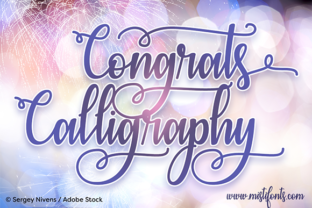
Congrats Calligraphy: A Festive Font That Brings Words to Life
There is something about handwritten lettering that feels personal. Even in a world of digital everything, a well-placed script font can make a message feel real. That is where Congrats Calligraphy comes in. It is a festive calligraphy font built for design and craft projects. But beyond the description, it is a tool for moments that matter—celebrations, announcements, branding, and everyday creativity.
If you have ever struggled to make a simple greeting feel special, or you wanted a design that stands out without screaming for attention, this font might be what you need. Let's look at where it fits, who uses it, and what you should know before you start working with it.
What Makes Congrats Calligraphy Different
The name says a lot. Congrats Calligraphy is designed around celebration. It carries a festive energy that works well for congratulations, well-wishes, and happy occasions. But it does not stop there. The font comes with PUA encoded swashes, which means you can access extra decorative characters without needing special software skills. These swashes add flourishes, tails, and ornaments that elevate plain text into something ornamental.
There is also a mix of English and German catchwords included. If you create content for international audiences or simply like the look of European typography, that gives you flexibility. The font feels both polished and playful, which makes it useful across a wide range of projects.
Where People Use This Font in Real Life
Understanding a font's purpose helps you decide if it fits your workflow. Congrats Calligraphy is not a generic sans-serif that works for body text. It is a display script meant to catch attention and convey emotion. Here are realistic scenarios where people actually use it.
Wedding and Event Invitations
If you are designing wedding invitations, save-the-dates, or party flyers, you need a font that feels elegant but not stiff. Congrats Calligraphy works well for couple names, event titles, and short phrases like "You're invited" or "Celebrate with us." The swashes let you add decorative underlines or ornamental accents without opening a separate illustration tool.
One bride I know used it for her wedding signage—table numbers, welcome boards, and thank-you cards. She said it made everything look cohesive without needing a professional calligrapher. For small business owners who offer invitation design services, this font can save hours of manual embellishment.
Greeting Cards and Personal Messages
Birthday cards, anniversary notes, new baby announcements, and graduation wishes all benefit from a personal touch. Congrats Calligraphy gives homemade cards a professional finish. Whether you print at home or use a local print shop, the font retains its detail at various sizes.
Freelancers and creatives who sell printable cards on Etsy or Gumroad often use fonts like this to stand out. The German catchwords add an unexpected twist for international buyers or themed collections. A simple "Herzlichen Glückwunsch" on the inside of a card feels thoughtful and unique.
Social Media Graphics and Digital Content
Marketers and content creators need visuals that stop the scroll. Congrats Calligraphy works well for Instagram stories, Pinterest pins, YouTube thumbnails, and Facebook posts. Use it for short headlines, quote overlays, or celebratory announcements like product launches and milestone achievements.
One blogger I follow uses it for her monthly roundup posts. She adds a "Thank You" header with a swash underline, and it gives her blog a consistent, warm aesthetic. The font is readable enough for digital screens when used at appropriate sizes, so you do not sacrifice clarity for style.
Small Business Branding and Packaging
Entrepreneurs and small business owners often look for branding elements that feel handmade. Congrats Calligraphy works for logo marks, product labels, and packaging inserts. If you sell candles, soaps, or stationery, the font can convey a boutique feel without a big design budget.
A friend who runs a small bakery uses it for her product tags and thank-you stickers. She says customers often comment on the packaging, and it has become part of her brand identity. For businesses that emphasize craftsmanship and personal attention, a calligraphy font like this reinforces that message visually.
Educational Materials and Classroom Decor
Teachers and educators can use Congrats Calligraphy for classroom posters, bulletin board headers, and student certificates. It works well for "Student of the Week" announcements, birthday charts, and inspirational quotes. The festive style adds energy to learning spaces without being distracting.
Homeschool parents also find it useful for creating custom worksheets, reward charts, and lesson materials. When you want something that feels special but still legible, this font strikes a good balance.
Planners, Journals, and DIY Projects
Hobbyists who enjoy bullet journaling or scrapbooking appreciate fonts that add flair. Congrats Calligraphy can be used for cover pages, section dividers, and milestone markers. If you print your own planner inserts, you can use the swashes to create decorative borders or header accents.
For crafters who make mugs, tote bags, or wall art, this font transfers well onto physical products. The PUA encoding means you can type swashes directly, which simplifies the design process when working with heat transfer vinyl or screen printing templates.
Different Users, Different Benefits
Not everyone uses a font the same way. Here is how different people get value from Congrats Calligraphy in their daily work or hobbies.
- Freelance designers save time by using PUA swashes instead of drawing custom flourishes. This means faster turnaround on projects and more consistent results.
- Small business owners build brand recognition with a consistent, elegant style across packaging, social media, and print materials.
- Event planners create cohesive stationery suites without hiring a calligrapher for every sign and card.
- Content creators add visual interest to digital assets without needing advanced design software skills.
- Everyday users make personal projects like photo albums, holiday cards, and gift tags look polished and intentional.
What to Consider Before Using Congrats Calligraphy
No font is perfect for every situation. Before you download or purchase Congrats Calligraphy, here are a few realistic things to keep in mind.
Readability at small sizes. Calligraphy fonts often lose legibility when scaled down. This font works best for titles, headings, and short phrases. If you need body text, pair it with a simple sans-serif or serif font. Test it at your intended size before committing.
Licensing and usage rights. If you plan to use the font for commercial projects like logos, product packaging, or digital products, check the license terms. Some fonts require an extended license for certain uses. Always read the fine print so you avoid legal issues later.
Software compatibility. PUA encoded fonts work in most modern design programs, but not all. If you use older software or free online editors, verify that the swashes display correctly. Programs like Adobe Illustrator, Photoshop, and Canva typically support PUA encoding.
Pairing with other fonts. Because Congrats Calligraphy has a strong personality, it works best when paired with neutral fonts. Avoid combining it with other busy scripts. A clean sans-serif like Open Sans or Lato lets the calligraphy take center stage without visual clutter.
File format and installation. Make sure you know how to install the font on your operating system. Most fonts come as OTF or TTF files. If you are not familiar with font installation, a quick tutorial can save frustration. Some platforms require you to restart your design software after installation.
How to Get the Most Out of It
Using Congrats Calligraphy effectively is about more than typing words. Experiment with the swashes and catchwords. Try different letter spacing to see how the flourishes interact. Use uppercase for impact and lowercase for a softer feel. Test it on different backgrounds—dark backgrounds with light text can make the swashes pop.
If you design for print, pay attention to kerning. Some calligraphy fonts have uneven spacing between certain letter pairs. Adjust manually when needed. For digital use, consider adding a subtle shadow or outline to improve contrast, especially over busy images.
Keep a folder of inspiration. Look at how others use calligraphy fonts in invitations, branding, and social media. Notice what works and what feels overcrowded. Over time, you will develop an instinct for when Congrats Calligraphy is the right choice and when a simpler font would serve you better.
Final Thoughts on a Font That Celebrates
Congrats Calligraphy is not a font you use for everyday paragraphs. It is a font you reach for when you want to say something matters. Whether you are designing a wedding invitation, building a brand, or making a card for a friend, the right typeface carries part of the message. This one brings warmth, elegance, and a touch of celebration to whatever you create.
If you enjoy working with script fonts and want something that offers both style and practical features like PUA swashes and multilingual catchwords, it is worth adding to your collection. Just remember to use it intentionally, pair it wisely, and test it in your actual project before you finalize. That is how you turn a nice font into a meaningful part of your work.